Put someone in a department
A department decides which numbers somebody can open. This is the only thing that grants that reach.
A department decides which numbers somebody can open. Putting a person in one is how they start seeing customer conversations; taking them out is how that stops.
From their row
Open Settings, then Team. Each person has a Departments column.
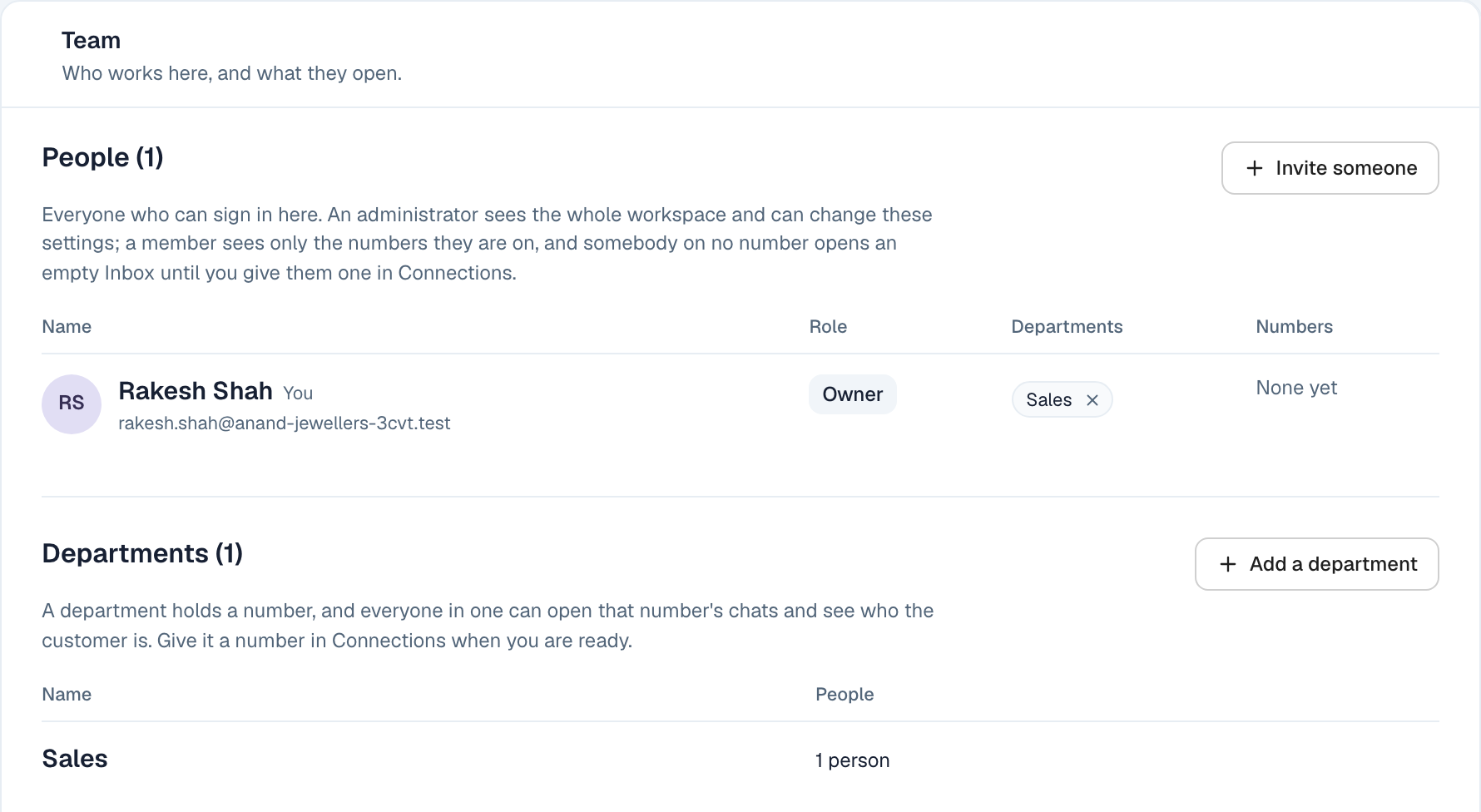
Press the Department picker on their row and choose one. It applies straight away — there is nothing to save.
Somebody can be in more than one. A person in both Sales and Accounts opens both those numbers' conversations.
Taking somebody out
Each department they are in shows as a small chip on their row, with a ✕. Pressing it removes them from that department.
They lose access to those conversations immediately. Nothing is deleted — the messages stay, and anyone still in the department carries on as before.
What changes for them
The moment somebody is in a department, the numbers routed to it appear in their Inbox, and they can see who the customer is on those conversations.
The moment they are not, those conversations are gone from their Inbox.
This is the only thing that grants reach. Being named in a chat, being assigned a piece of work, or being mentioned by a colleague does not give somebody access to a customer they could not otherwise see.
If their Inbox is empty
Almost always: they are in no department, or their department has no number.
Check their row first. If the Departments column says None yet, that is the answer. If they are in a department, check that a number is actually routed to it under Connections.