Ask Reva
The assistant that has read your chats, calls, work and registers. What it can answer, the documents it reads, and what it can do for you.
Ask Reva is the assistant that has read your chats, calls, work and registers. Ask it what you would otherwise ask four people, and tell it what you want done.
Where it is
- On the web: Ask Reva in the left rail, or the Ask Reva button at the top of any page. On a customer's page it answers about that customer.
- On the phone: the round Reva button in the dock.
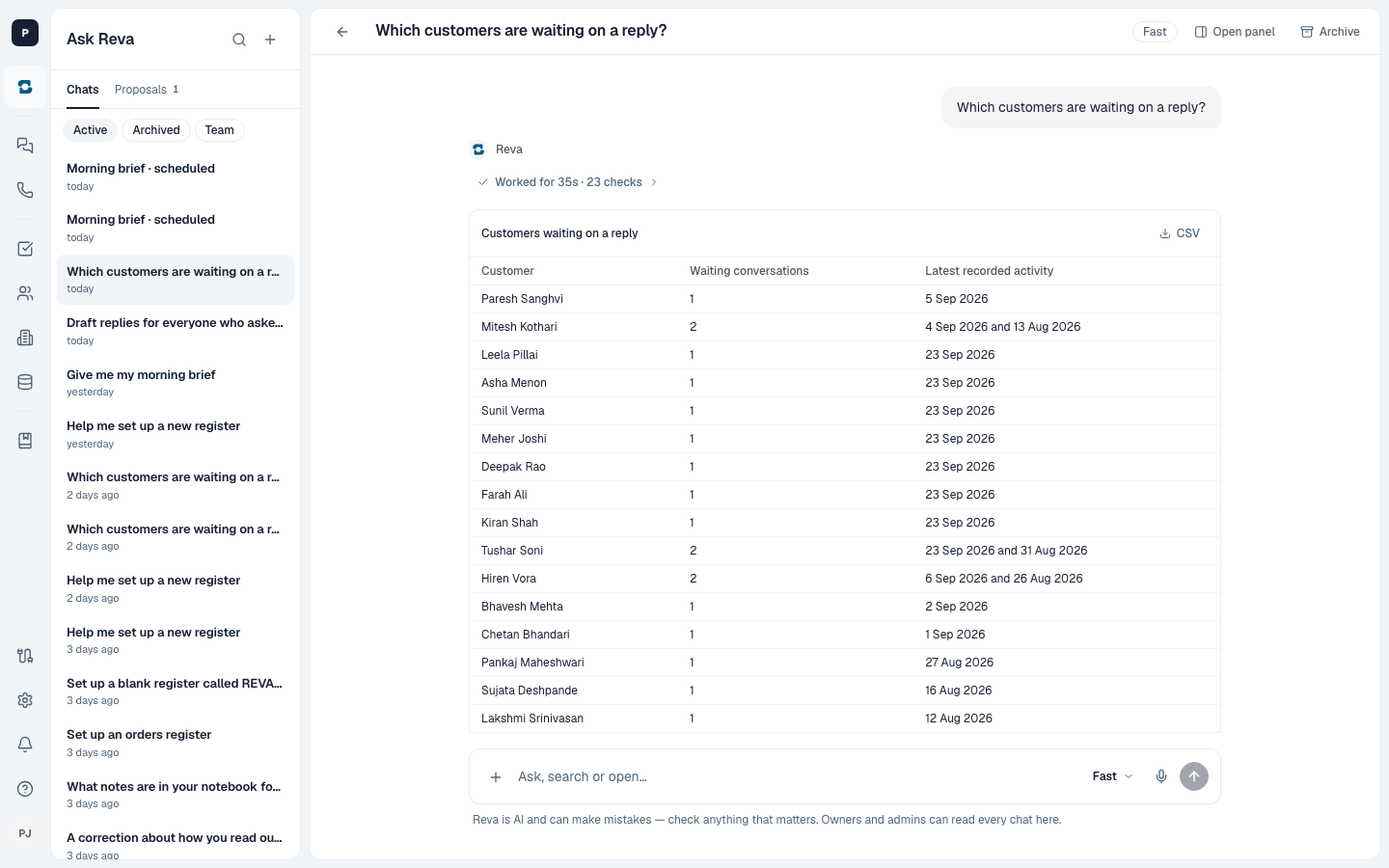
Type in Hindi or English, or hold the mic and speak. Reva shows its working as it goes and answers from the records it can see, showing where a fact came from and saying so when something is missing. Check anything that matters against the source before you act on it.
Find out what is happening
- "What's overdue today?"
- "Which customers are waiting on a reply?"
- "What did we promise customers on yesterday's calls?"
- "What is Aarav working on?"
- "Where is Paresh's temple necklace?"
When the answer is a list, it comes back as a table you can download as CSV.
Know a customer before you call them
Ask about a customer by name, even by the name you use for them ("Paresh bhai"). Reva reads the chats, calls, orders and notes about them that you are allowed to see, and tells you what they are waiting on and what was promised, as far as those records show it.
Read your registers and sales
- "Which orders are due this week?"
- "How many orders are with the karigar?"
- "Which items sold most last month?", read from a sales register or a file you imported.
Read a document
Attach a file and ask about it: a customer's design, a karigar's bill, a price list. Files up to 25 MB, in these formats: PDF, CSV or XLSX, TXT or MD, and JPG, PNG or WEBP photos. iPhone HEIC photos are not accepted yet; convert them first. Reva can turn what a document asks for into work.
Get a reply written
Ask Reva to draft a reply to a customer. It uses only what is already in the chat, what it remembers about the customer, and your playbook, and it says so plainly when something is missing, such as today's gold rate, rather than guessing. You read it and send it yourself.
Get things done
- Work: ask Reva to raise work, reassign it, change its due date or close it. This happens straight away, as you, with exactly the permissions you have on the Work screen, so check the result it reports.
- Registers: an entry you tell Reva to add, or a value you tell it to change, is recorded straight away, as you. Creating a register, moving an entry to another stage, and entries Reva found in a chat or a file come back as a card instead. When Reva suggests a register or entries, nothing is added until someone who can decide approves the card. See Waiting for you.
To leave an internal note on a chat, open the conversation and write it yourself; see The Inbox.
Follow your way of working
Reva follows your playbook: how you answer a gold rate question, how you handle an old gold exchange, what goes in the morning brief. In the chat, + lets you pick a playbook for this question, or leave Reva to choose. See Knowledge.
How hard it thinks
Choose at the bottom of the chat:
- Balanced: quick, clear answers. The default.
- Smart: thinks harder and takes longer, for difficult questions.
Past chats
Your chats are kept in the sidebar. On the web, search them and archive the ones you are done with; archived chats have their own list. On the phone they are under Past chats.
Owners and admins can also open Team to read their colleagues' chats.